Cypress
Add visual checks to your existing Cypress tests with the @wopee-io/wopee.cy plugin. Each cy.wopeeTrack() sends a screenshot to Wopee.io, which compares it with the approved baseline. You review the differences in Commander and approve or reject them.
This page walks through a complete example on Sauce Demo: two screenshots, a first run that creates the baselines, and a second run that catches a visual bug. Verified with @wopee-io/wopee.cy 4.13.1 and Cypress 16.2.0. Prefer a ready project? Start from the template project.
Prerequisites
- Cypress 13 to 16, with
@wopee-io/wopee.cy4.13.4 or newer, which waits for web fonts and images before each screenshot (4.12.2 and older work with Cypress 13 and 14 only) - The Node.js version your Cypress needs: 22 or 24 for Cypress 16, 20 or newer for Cypress 13 to 15
- A Wopee.io account at cmd.wopee.io
1. Create a project
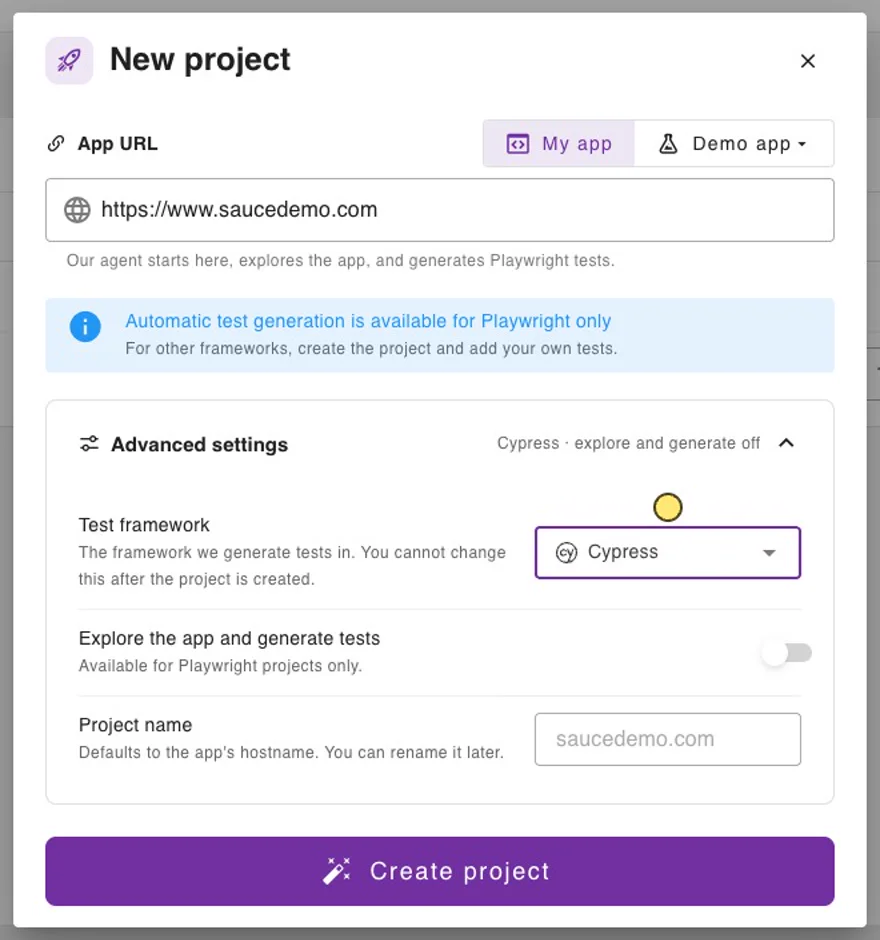
- In Commander, click NEW PROJECT and paste the App URL (for example
https://www.saucedemo.com). - Open Advanced settings and set Test framework to Cypress. Explore the app and generate tests switches off, because test generation is available for Playwright only.
- Click Create project.
2. Get the API key
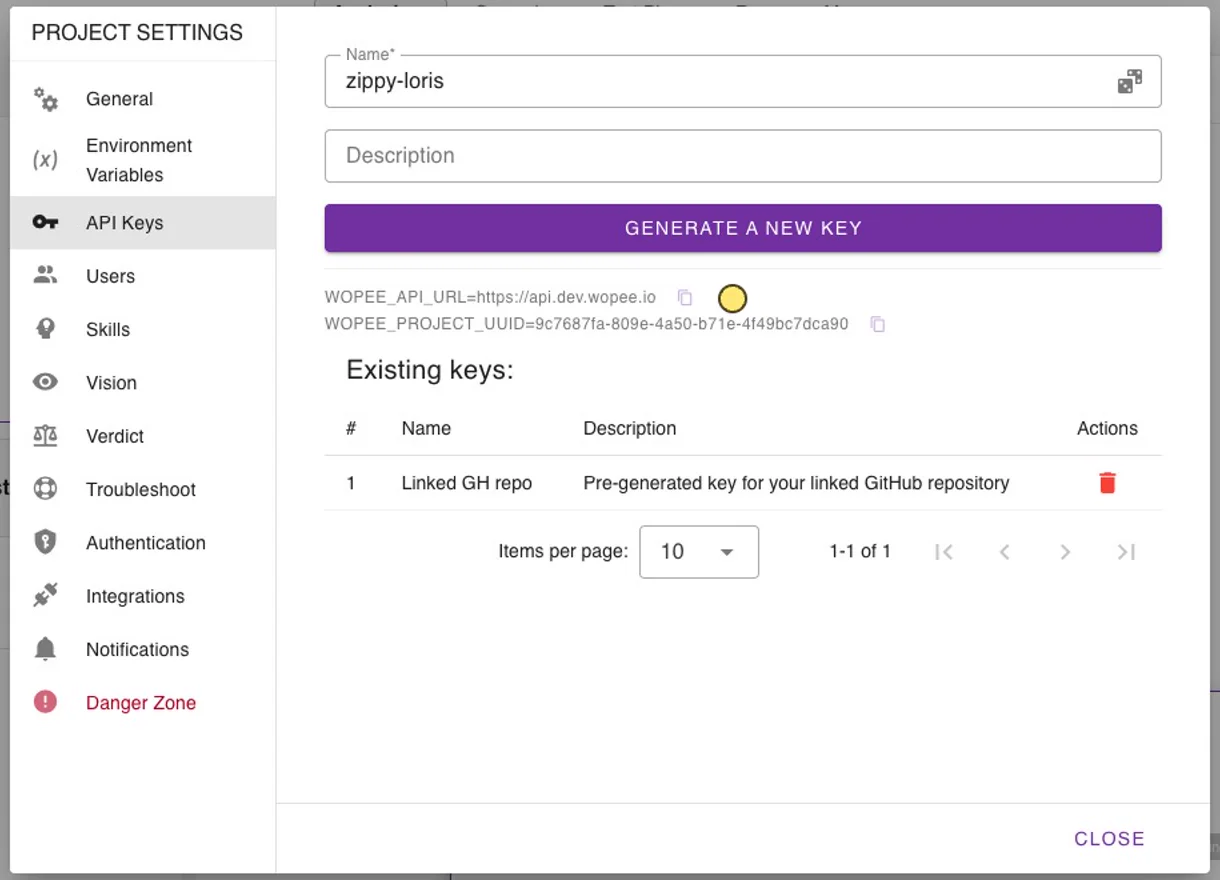
- In the project, open More › Settings › API Keys and copy
WOPEE_PROJECT_UUID. - Enter a name, click Generate a new key and copy
WOPEE_API_KEY. The key is shown only once.
3. Install
In a new folder (skip npm init in an existing project):
npm init -y
npm install -D cypress@16.2.0 @wopee-io/wopee.cy dotenv
Create a .env file in the project root:
WOPEE_PROJECT_UUID=your-project-uuid
WOPEE_API_KEY=your-api-key
WOPEE_API_URL is needed only for a self-hosted instance (its URL is shown in API Keys); the plugin defaults to https://api.wopee.io. Add .env to .gitignore. In CI, set the same variables as secrets; values already set in the environment take precedence over .env.
4. Register the plugin
The plugin reads its settings from the wopee object in env, not from the WOPEE_* variables directly. Map them in the Cypress config:
require("dotenv").config();
const { defineConfig } = require("cypress");
const { addWopeePlugin } = require("@wopee-io/wopee.cy");

module.exports = defineConfig({
  viewportWidth: 1280,
  viewportHeight: 800,
  env: {
    wopee: {
      apiUrl: process.env.WOPEE_API_URL,
      apiKey: process.env.WOPEE_API_KEY,
      projectUuid: process.env.WOPEE_PROJECT_UUID,
    },
  },
  e2e: {
    baseUrl: "https://www.saucedemo.com",
    setupNodeEvents(on, config) {
      addWopeePlugin(on, config);
    },
  },
});
For a TypeScript config (cypress.config.ts) use import "dotenv/config"; and import { addWopeePlugin } from "@wopee-io/wopee.cy";. More options of the wopee object are in the plugin reference.
5. Register the commands
import { addWopeeCommands } from "@wopee-io/wopee.cy";

addWopeeCommands();
6. Track screenshots in your test
/// <reference types="cypress" />
/// <reference types="@wopee-io/wopee.cy" />

const pad = (n) => String(n).padStart(2, "0");
const now = new Date();
const stamp = `${now.getFullYear()}-${pad(now.getMonth() + 1)}-${pad(now.getDate())} ${pad(now.getHours())}:${pad(now.getMinutes())}`;
const suiteName = `Cypress demo ${stamp}`;

describe(suiteName, () => {
  before(() => cy.wopeeStartSuite(suiteName));
  beforeEach(() => cy.wopeeStartScenario("Cypress: login and products"));
  afterEach(() => cy.wopeeStopScenario());

  it("login and products", () => {
    cy.visit("/");
    cy.wopeeTrack({ stepName: "Login page" });

    cy.get("[data-test=username]").type(Cypress.expose("SAUCE_USER") || "standard_user");
    cy.get("[data-test=password]").type("secret_sauce");
    cy.get("[data-test=login-button]").click();
    cy.get(".inventory_list").should("be.visible");
    cy.wopeeTrack({ stepName: "Products" });
  });
});
| Command | Where | Purpose |
|---|---|---|
cy.wopeeStartSuite(name) |
before |
Starts a suite (one entry in Runs). Required before the first track. A suite with the same name and branch is reused, so the timestamp gives every run its own entry. |
cy.wopeeStartScenario(name) |
beforeEach |
Starts a scenario. Use a stable name; it is part of the baseline key. |
cy.wopeeTrack({ stepName }) |
in the test | Waits for the page's web fonts and images (up to 5 seconds), takes a full-page screenshot and compares it with the baseline. Chained after cy.get() it captures one element. |
cy.wopeeStopScenario() |
afterEach |
Closes the scenario. |
7. First run: create the baselines
npx cypress run
[wopee]: Suite(name=Cypress demo 2026-10-12 21:21, uuid=...) is activated.
[wopee]: Scenario(name=Cypress: login and products, uuid=...) is started.
[wopee]: Tracking response: {"stepName":"Login page","imageUrl":"https://cmd.wopee.io/tests?...&tab=RUNS","status":"new"}
[wopee]: Tracking response: {"stepName":"Products","imageUrl":"https://cmd.wopee.io/tests?...&tab=RUNS","status":"new"}
[wopee]: Scenario(name=Cypress: login and products, uuid=...) is stopped.
    ✓ login and products (7250ms)
Both steps are new: there is no baseline yet. Each imageUrl opens the step in Commander. The plugin deletes the local screenshots after the upload.
8. Approve in Runs
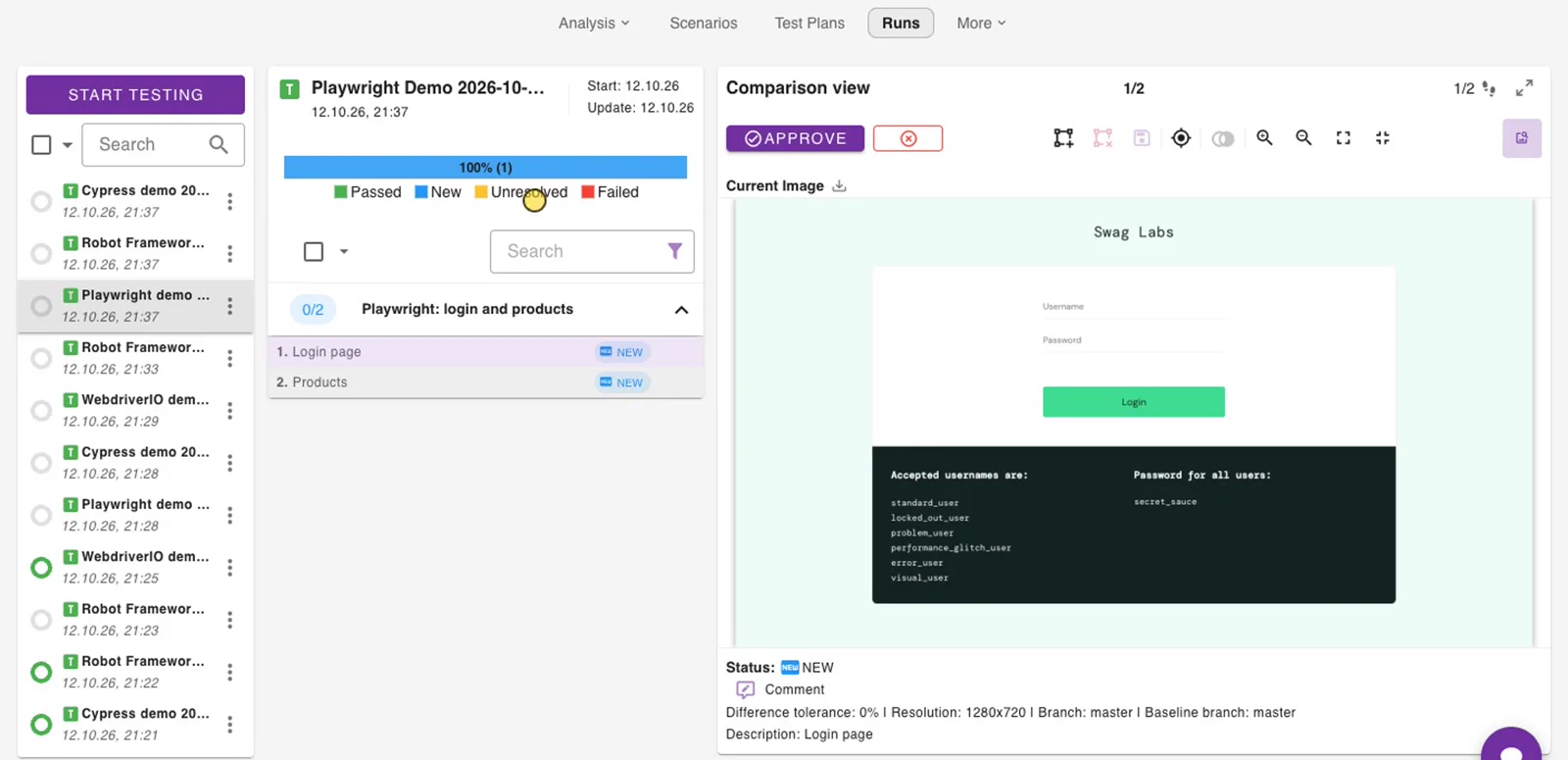
Open the project and go to Runs. Select the run Cypress demo ..., then each step, and click Approve. The screenshot becomes the baseline.
9. Second run: catch a visual bug
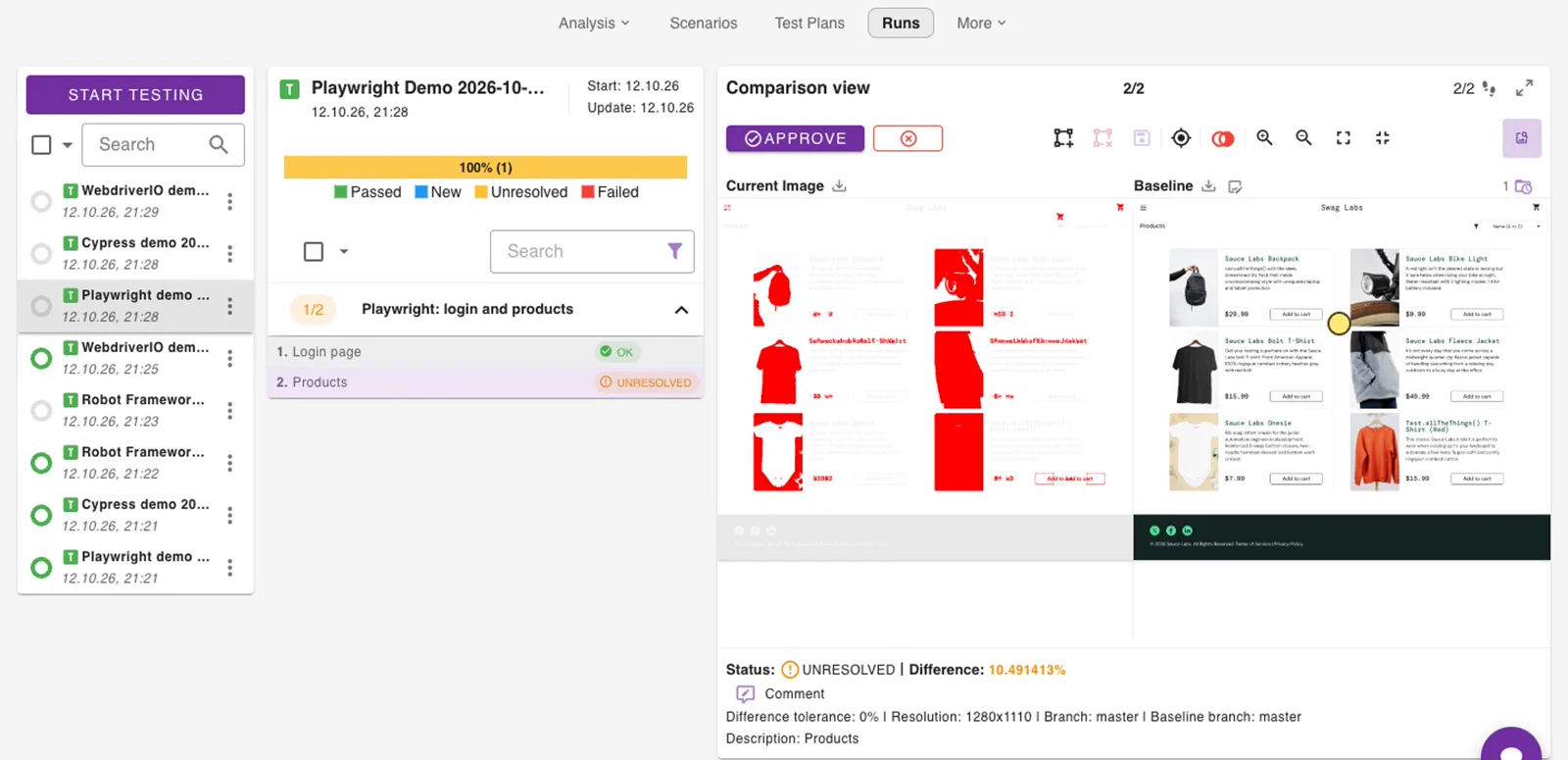
Sauce Demo has a visual_user whose products page is visually broken. Run the same test as that user:
npx cypress run --expose SAUCE_USER=visual_user
Cypress.expose() and --expose exist since Cypress 15.10. Cypress.expose() reads only values passed with --expose; for environment variables such as CYPRESS_SAUCE_USER, or the ones set in Commander, use cy.env(["SAUCE_USER"]).then(({ SAUCE_USER }) => …). On older Cypress, read the user with Cypress.env("SAUCE_USER") in the test and run CYPRESS_SAUCE_USER=visual_user npx cypress run.
[wopee]: Tracking response: {"stepName":"Login page",...,"status":"ok"}
[wopee]: Tracking response: {"stepName":"Products",...,"status":"unresolved"}
    ✓ login and products (6475ms)
Login page matches the baseline. Products is unresolved. Open the step in Runs, inspect the highlighted differences and Reject it as a bug, or Approve it if the change is intended.
Good to know
- A difference does not fail the test. The Cypress run stays green and the step waits for review in Commander. To act on the result in the test, pass a callback:
cy.wopeeTrack({ stepName: "Products" }, (result) => { /* result.status */ }). - Baselines are identified by
<scenario name>-<step name>plus the branch and the environment labels. Keep both names stable between runs. - Branches: set
branchNamein thewopeeobject (defaultmaster), for example fromprocess.env.WOPEE_BRANCH_NAME. See Baselines and branches. - Statuses:
new,ok,unresolved,autoApproved. See How it works. - All commands, options and more examples: plugin reference.
Troubleshooting
| Message | Fix |
|---|---|
Class extends value undefined is not a constructor or null (in agent-base / http-proxy-agent) |
Cypress 15 or newer with @wopee-io/wopee.cy 4.12.2 or older. Update the plugin: npm install -D @wopee-io/wopee.cy@latest. |
Cypress.env() was removed in Cypress version 16.0.0 |
Your own test code calls Cypress.env(). Use Cypress.expose() for values passed with --expose (see step 9) and cy.env() for environment variables, including the ones set in Commander. If the message comes from cy.wopeeTrack(), update the plugin to 4.13.1 or newer. |
Cannot find module '.../Cypress.app/Contents/MacOS/Contents/Resources/app/index.js' or bad option: --no-sandbox |
Cypress was started from a terminal inside VS Code (or another Electron app) that exports ELECTRON_RUN_AS_NODE=1. Start it with env -u ELECTRON_RUN_AS_NODE npx cypress run, or use another terminal. |
| Fonts or product images are missing in the screenshots | Update the plugin to 4.13.4 or newer, which waits for them. On a slow page raise waitForAssetsTimeout (see Wait for fonts and images). CSS background images are not awaited: wait for the element with cy.get(...).should("be.visible"). |
[wopee.cy] Fonts or images still loading after 5000 ms |
Some font or image did not finish in time and the screenshot was taken anyway. Raise waitForAssetsTimeout, or check the browser console for a font or image that never loads. |
apiKey or projectUuid reported missing |
WOPEE_API_KEY or WOPEE_PROJECT_UUID is not set, or the env.wopee object is missing in the Cypress config. |
There is no Suite and no Scenario started |
Call cy.wopeeStartSuite() in before(). |
cy.wopeeTrack is not a function |
Add addWopeeCommands() to cypress/support/e2e.js. |
Can't run because no spec files were found |
Spec files must match specPattern, by default cypress/e2e/**/*.cy.{js,jsx,ts,tsx}. |
| All runs end up in one entry in Runs | The suite name is constant. Add a timestamp or build ID to it. |
A step stays new on the second run |
The step from the first run was not approved, or the scenario or step name changed. |