Playwright
Add visual checks to your existing Playwright tests. Each wopee.track...() call sends a screenshot to Wopee.io, which compares it with the approved baseline. You review the differences in Commander and approve or reject them.
This page walks through a complete example on Sauce Demo: two screenshots, a first run that creates the baselines, and a second run that catches a visual bug. Verified with @wopee-io/wopee.pw 4.26.1 and @playwright/test 1.64.
Prerequisites
- Node.js 20 or newer
- An existing Playwright project, or a new one as below
- A Wopee.io account at cmd.wopee.io
1. Create a project
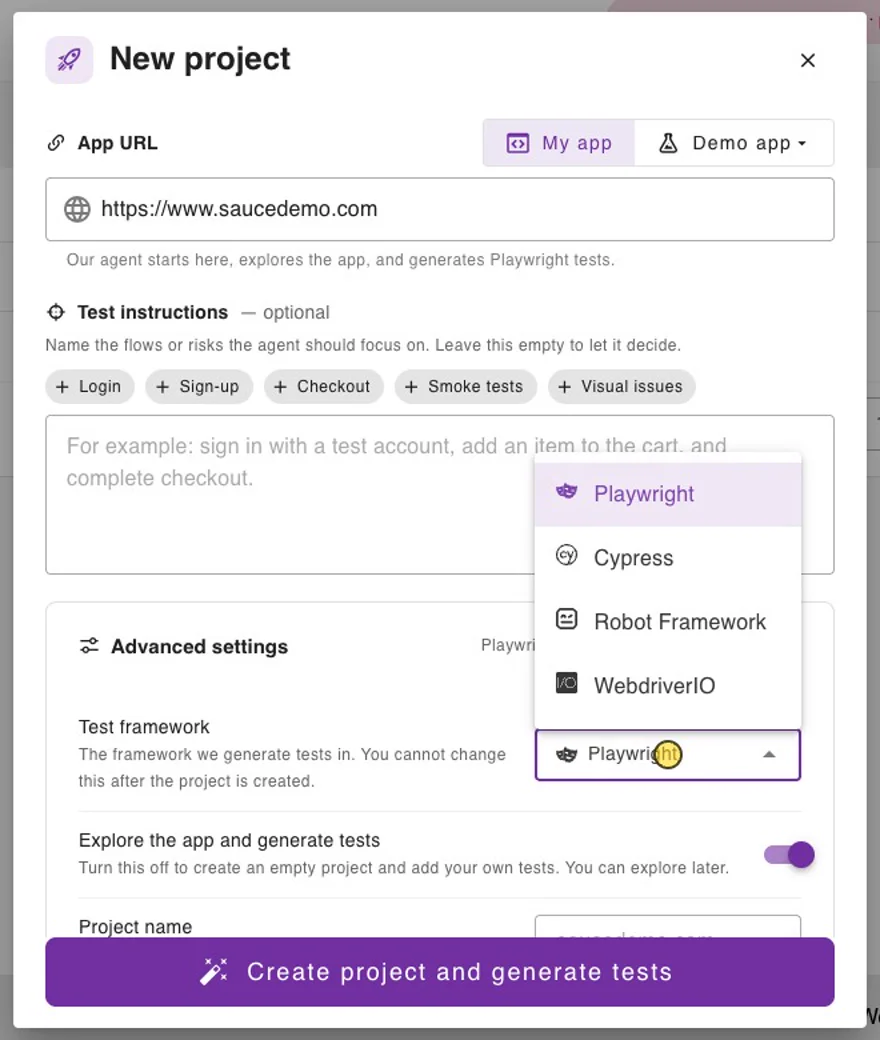
- In Commander, click NEW PROJECT and paste the App URL (for example
https://www.saucedemo.com). - Open Advanced settings, keep Test framework on Playwright and switch off Explore the app and generate tests. You bring your own tests, so the AI exploration is not needed.
- Click Create project.
2. Get the API key
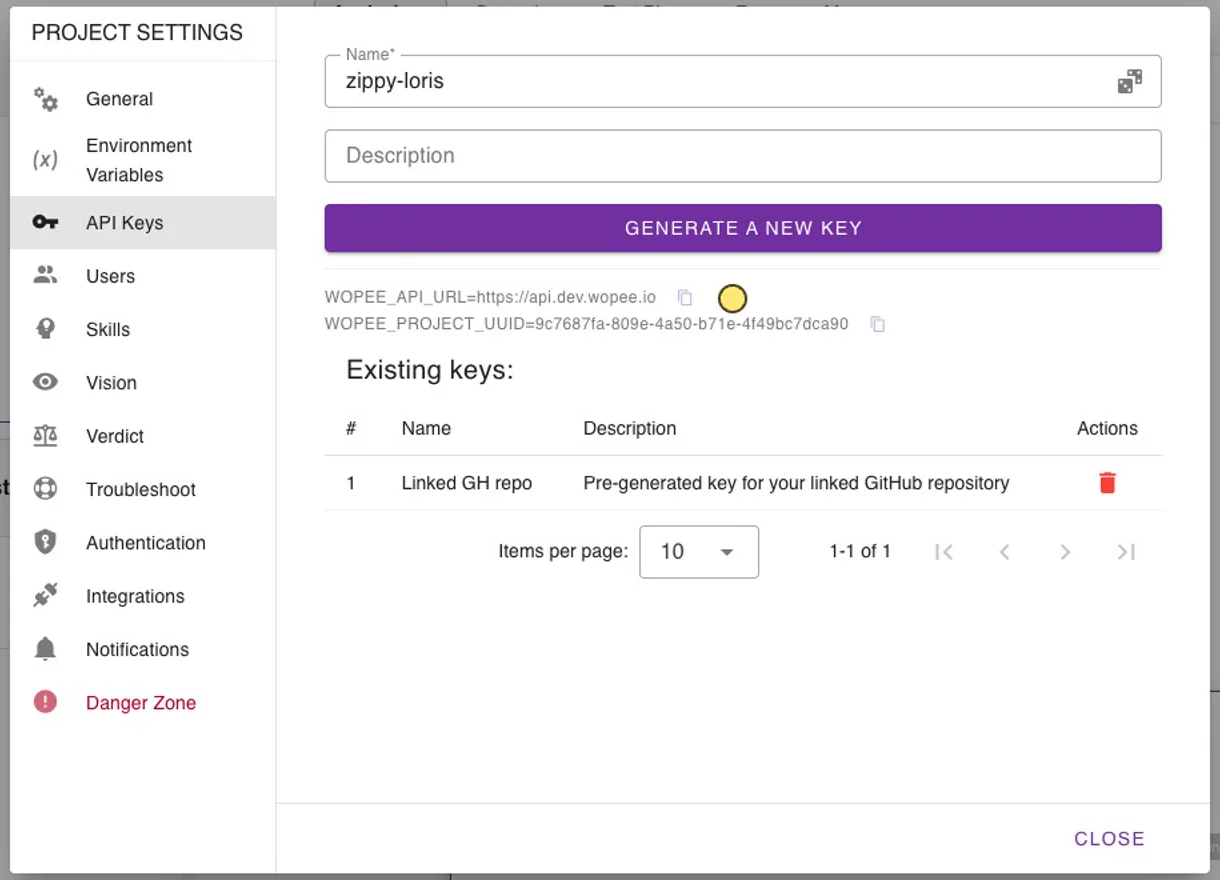
- In the project, open More › Settings › API Keys and copy
WOPEE_API_URLandWOPEE_PROJECT_UUID. - Click Generate a new key and copy
WOPEE_API_KEY. The key is shown only once.
3. Install
In a new folder (skip npm init and the browser install in an existing Playwright project):
npm init -y
npm i -D @playwright/test @wopee-io/wopee.pw @types/node
npx playwright install chromium
Create a .env file next to playwright.config.ts:
The package loads .env by itself; you do not need to import dotenv. Add .env to .gitignore. In CI, set the same three variables as secrets instead.
4. Configure Playwright
Add the Wopee.io reporter next to your usual reporter. It uploads the test results and stops the suite when the run ends.
import { defineConfig, devices } from '@playwright/test';

export default defineConfig({
  testDir: './tests',
  workers: 1,
  reporter: [['list'], ['@wopee-io/wopee.pw/wopee-reporter']],
  use: {
    ...devices['Desktop Chrome'],
    baseURL: 'https://www.saucedemo.com',
  },
});
5. Track screenshots in your test
import { test } from '@playwright/test';
import { Wopee } from '@wopee-io/wopee.pw';

const wopee = new Wopee();
const user = process.env.SAUCE_USER ?? 'standard_user';

test.beforeAll(async () => {
  const now = new Date().toLocaleString('sv-SE').slice(0, 16); // YYYY-MM-DD HH:MM
  await wopee.startSuite(`Playwright demo ${now}`);
});

test.beforeEach(async ({}, testInfo) => {
  await wopee.startScenario(testInfo.title, testInfo);
});

test.afterEach(async () => {
  await wopee.stopScenario();
});

test('Playwright: login and products', async ({ page }) => {
  await page.goto('/');
  await wopee.trackFullPage({ page, stepName: 'Login page' });

  await page.getByPlaceholder('Username').fill(user);
  await page.getByPlaceholder('Password').fill('secret_sauce');
  await page.getByRole('button', { name: 'Login' }).click();
  await page.locator('.inventory_list').waitFor();

  await wopee.trackFullPage({ page, stepName: 'Products' });
});
| Call | Where | Purpose |
|---|---|---|
new Wopee() |
top of the file | Reads the configuration. Fails at once if WOPEE_API_KEY or WOPEE_PROJECT_UUID is missing. |
wopee.startSuite(name) |
beforeAll |
Starts a suite (one entry in Runs). A suite with the same name and branch is reused, so the timestamp gives every run its own entry. |
wopee.startScenario(testInfo.title, testInfo) |
beforeEach |
Starts a scenario named after the test. Required: without it the first track call throws There is no Scenario started, and no scenarioName provided. Passing testInfo lets the reporter link the test result and stop the suite. |
wopee.trackFullPage({ page, stepName }) |
in the test | Takes a full-page screenshot and compares it with the baseline. |
wopee.stopScenario() |
afterEach |
Closes the scenario. |
Other track methods:
wopee.trackViewport({ page, stepName })captures the visible part of the page.wopee.trackElement({ locator, stepName })captures one element.wopee.trackImage({ imageBase64, stepName })sends a PNG you captured yourself.
All of them accept the optional comment, customTags, viewport, pixelToPixelDiffTolerance and baselineBranchName, and return { stepName, imageUrl, status }.
Wait for the content you want to capture before each track call, as the test does with .inventory_list. See Wait for fonts and images before tracking.
6. First run: create the baselines
[wopee]: Suite(name=Playwright demo 2026-10-12 21:21, uuid=...) is activated.
[wopee]: Scenario(name=Playwright: login and products, uuid=...) is started.
[wopee]: Tracking response: {"stepName":"Login page","imageUrl":"https://cmd.wopee.io/tests?...&tab=RUNS","status":"new"}
[wopee]: Tracking response: {"stepName":"Products","imageUrl":"https://cmd.wopee.io/tests?...&tab=RUNS","status":"new"}
[wopee]: Scenario(name=Playwright: login and products, uuid=...) is stopped.
  ✓  1 tests/saucedemo.spec.ts:20:5 › Playwright: login and products (4.7s)

  1 passed (10.5s)
Uploading 1 remaining test results...
Successfully uploaded all test results.
Suite(uuid=...) is stopped.
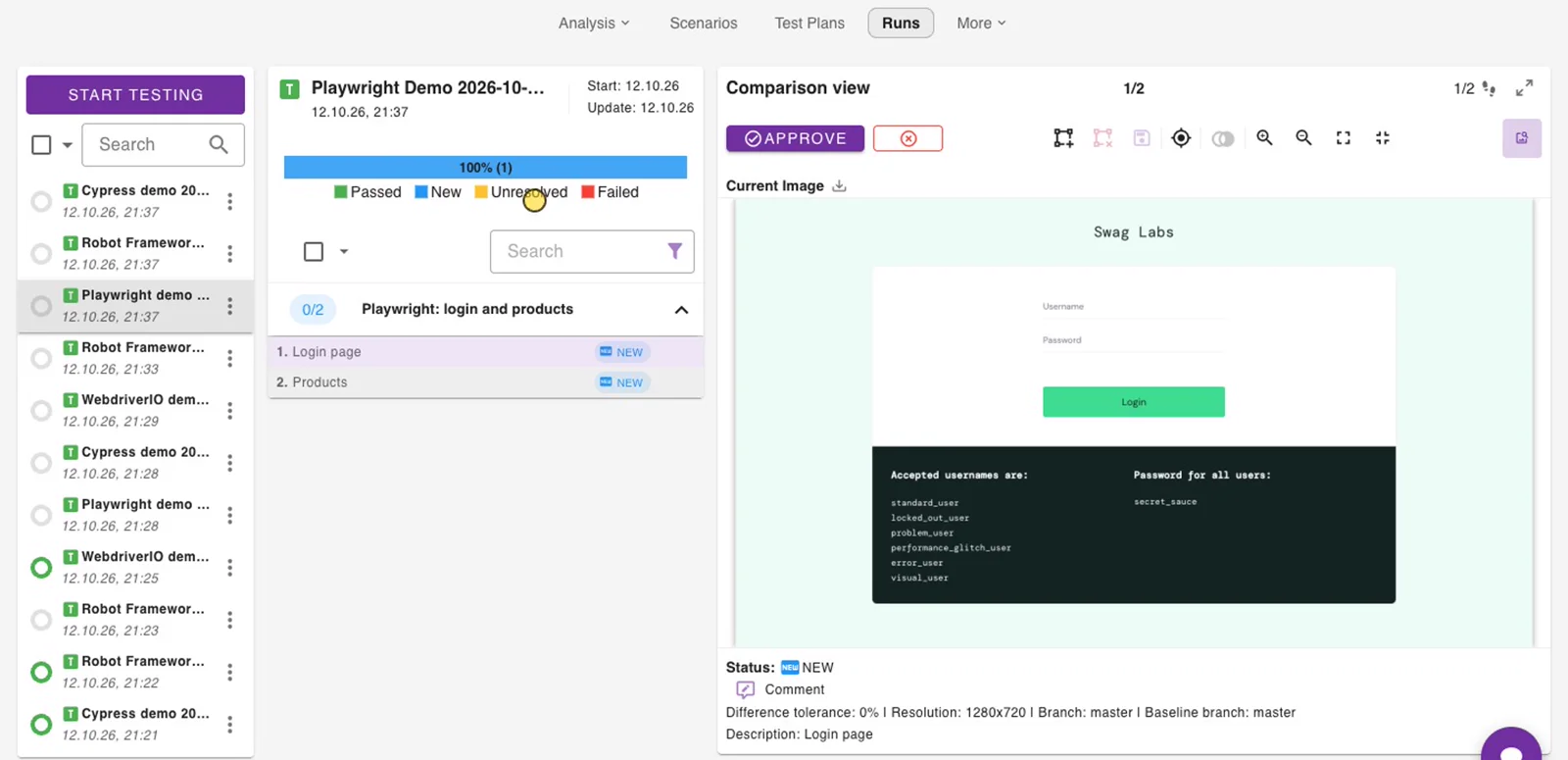
Both steps are new: there is no baseline yet. Each imageUrl opens the step in Commander.
7. Approve in Runs
Open the project and go to Runs. Select the run Playwright demo ..., then each step, and click Approve. The screenshot becomes the baseline.
8. Second run: catch a visual bug
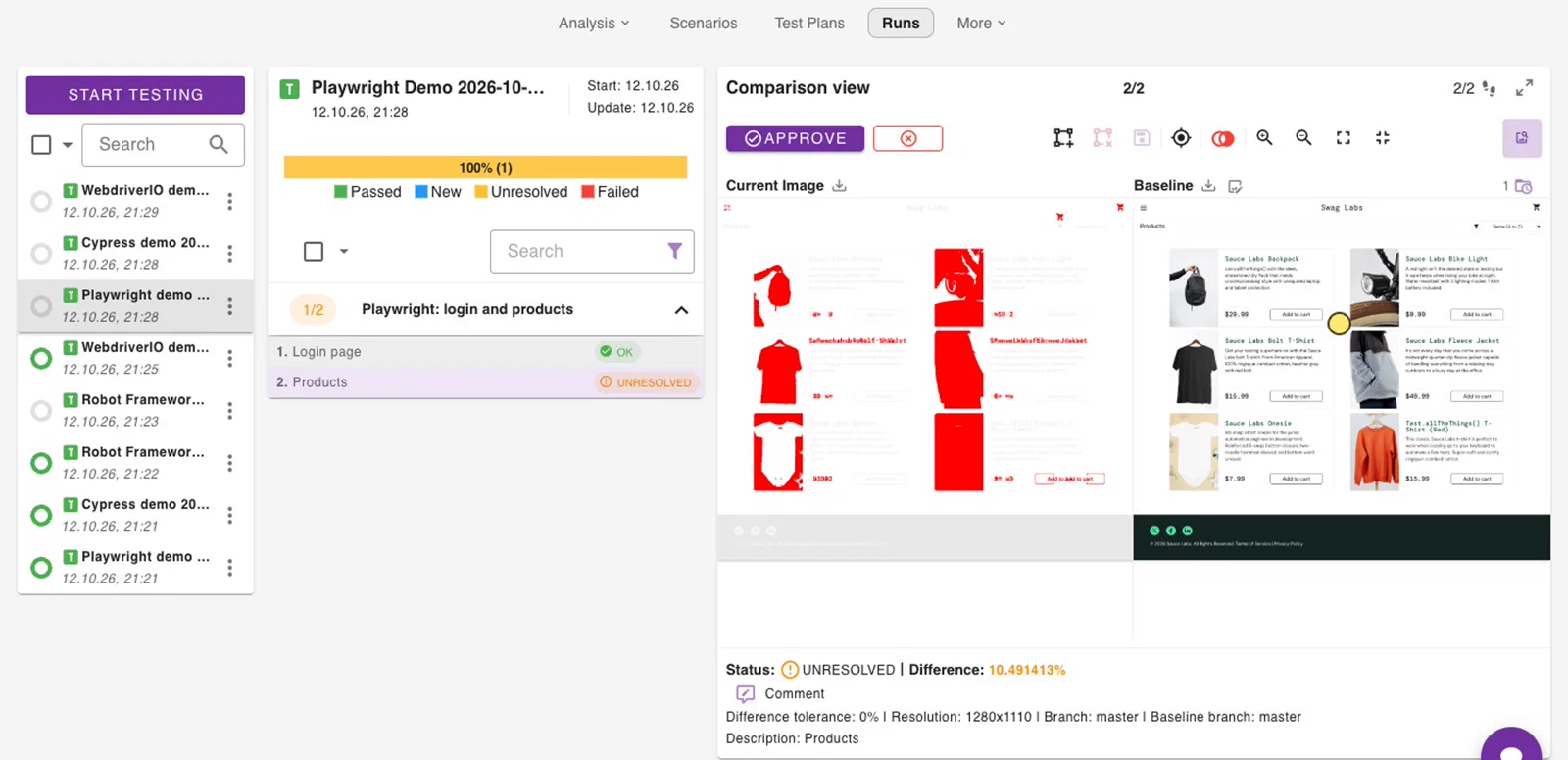
Sauce Demo has a visual_user whose products page is visually broken. Run the same test as that user:
[wopee]: Tracking response: {"stepName":"Login page",...,"status":"ok"}
[wopee]: Tracking response: {"stepName":"Products",...,"status":"unresolved"}
  ✓  1 tests/saucedemo.spec.ts:20:5 › Playwright: login and products (4.1s)
Login page matches the baseline. Products is unresolved: open it in Runs, inspect the highlighted differences and Reject it as a bug, or Approve it if the change is intended.
Good to know
-
A difference does not fail the test. The Playwright test passes and the step waits for review. To fail the test as well, check the returned status:
-
Baselines are identified by
<scenario name>-<step name>(herePlaywright: login and products-Products) plus the branch and the OS, browser, viewport, device and custom tags labels. Renaming a test or a step starts a new baseline. - Branches:
WOPEE_BRANCH_NAMEsets the branch of the run (defaultmaster).WOPEE_BASELINE_BRANCH_NAMEsets the branch to compare with when the current branch has no baseline yet, for examplemasterfor a feature branch. Merge approved baselines with More › Baselines › Merge Branches. See Baselines and branches. - Statuses:
new,ok,unresolved,autoApproved. See How it works.
Configuration
All options are environment variables (shell, .env file or CI secrets).
| Variable | Required | Description |
|---|---|---|
WOPEE_API_KEY |
yes | Project API key (More › Settings › API Keys). |
WOPEE_PROJECT_UUID |
yes | Project UUID (same place). |
WOPEE_API_URL |
no | API endpoint. Default https://api.wopee.io. |
WOPEE_BRANCH_NAME |
no | Branch of this run. Default master. |
WOPEE_BASELINE_BRANCH_NAME |
no | Branch to take baselines from when the current branch has none. |
WOPEE_SCREENSHOT_VALIDATION_ENABLED |
no | Switches all Wopee.io calls on or off. Default on. See the warning below. |
WOPEE_SUITE_UUID |
no | Report into an existing suite instead of creating one. |
WOPEE_PIXEL_TO_PIXEL_DIFF_TOLERANCE |
no | Difference in percent that still counts as a match. |
WOPEE_BROWSER, WOPEE_OS, WOPEE_VIEWPORT, WOPEE_DEVICE |
no | Labels that are part of the baseline identity. |
WOPEE_CUSTOM_TAGS |
no | Tags added to every step; also part of the baseline identity. |
WOPEE_COMMENT |
no | Comment added to every step. |
WOPEE_COLLECT_PAGE_CONTENT |
no | Also send the page HTML with trackFullPage and trackViewport. |
WOPEE_API_TIMEOUT_MS |
no | Timeout of one API call. Default 180000; 0 means no limit. |
WOPEE_API_MAX_RETRIES |
no | Retries of a call that did not get through (timeouts, 408, 429, 502, 503, 504). Default 2. |
The standard HTTPS_PROXY and NO_PROXY variables are honoured.
WOPEE_SCREENSHOT_VALIDATION_ENABLED=false does not switch Wopee.io off
In @wopee-io/wopee.pw 4.26.1 the value is read as a string, and any non-empty string, false included, counts as on. To run the tests without Wopee.io, set the variable to an empty value (WOPEE_SCREENSHOT_VALIDATION_ENABLED=). The track calls then return null and nothing is sent.
Troubleshooting
| Message | Fix |
|---|---|
There is no Scenario started, and no scenarioName provided |
Call wopee.startScenario(testInfo.title, testInfo) in beforeEach, or pass scenarioName to every track call. The Quick Start in the npm README misses this call. |
Wopee is not configured — missing required environment variables |
WOPEE_API_KEY or WOPEE_PROJECT_UUID is not set. Check that .env is next to playwright.config.ts or that the CI secret is exported. |
must be an absolute URL including the scheme |
Write WOPEE_API_URL with https://. |
| All runs end up in one entry in Runs | The suite name is constant. Add a timestamp or build ID to the name passed to startSuite. |
A step stays new on the second run |
The step from the first run was not approved, or the scenario or step name changed. |