Wopee.io MCP server
The Wopee.io MCP server (npm package wopee-mcp, registry name io.github.Wopee-io/wopee-mcp) connects your AI coding agent to your Wopee.io project over the Model Context Protocol. From the chat, the agent can explore your web app, generate user stories and test cases, start Wopee.io's testing agent on them, read the verdicts with the agent's report, and file a failed run as a GitHub issue. The browsers run on Wopee.io's runners, not on your machine.
Playwright MCP gives your agent a browser to drive step by step. The Wopee.io MCP server gives it a tester: one call starts a test run in the cloud, and the agent gets back a verdict with evidence. Your tests, their history and the reports stay in your Wopee.io project, where your team can open them in Commander.
Video
Watch an AI QA agent in Cursor use the Wopee.io, Playwright and Atlassian MCP servers.
Add it to your agent
| Agent | Config file | One-click install | Guide |
|---|---|---|---|
| Claude Code | .mcp.json (project), ~/.claude.json |
no, one CLI command | Claude Code |
| GitHub Copilot (VS Code, Copilot CLI, cloud agent) | .vscode/mcp.json, ~/.copilot/mcp-config.json |
VS Code install link | GitHub Copilot |
| Cursor | .cursor/mcp.json, ~/.cursor/mcp.json |
Cursor install link | Cursor |
| OpenCode | opencode.json, ~/.config/opencode/opencode.json |
no | OpenCode |
| OpenAI Codex (CLI, IDE extension, ChatGPT desktop app) | ~/.codex/config.toml |
no, one CLI command | OpenAI Codex |
| Google Antigravity, Gemini CLI | ~/.gemini/config/mcp_config.json, ~/.gemini/settings.json |
no | Antigravity and Gemini CLI |
| JetBrains AI Assistant, Junie | IDE settings, .junie/mcp/mcp.json |
no | JetBrains |
| Devin Desktop (formerly Windsurf) | ~/.config/devin/mcp_config.json |
no | Devin Desktop |
| Visual Studio | .mcp.json, .vs\mcp.json |
no | Visual Studio |
| Zed, Cline, Kilo Code, Warp, Kiro, Goose, Continue, Augment, Claude Desktop | varies | Goose only | Other MCP clients |
Tested on 27 October 2026 with wopee-mcp 1.32.0: Claude Code, GitHub Copilot in VS Code 1.143, Copilot CLI 1.0.40, Cursor 3.15 and OpenCode 1.18. The other guides follow each vendor's documentation.
Requirements
- Node.js 20.18 or newer (Node.js 22 recommended). The server runs with
npx, so there is nothing else to install. - A Wopee.io project. Create one at cmd.wopee.io, see Getting started.
- A project API key and the project UUID, from More › Settings › API Keys in the project.
- An MCP client that supports local (stdio) servers. The Wopee.io MCP server has no hosted HTTP endpoint.
wopee-mcp1.32.0 or newer. Withnpx -y wopee-mcpyou get the latest version on every start.
Quick start
Three steps, about five minutes. The example uses Claude Code; the tabs show the same step in other agents.
1. Get your API key and project UUID
-
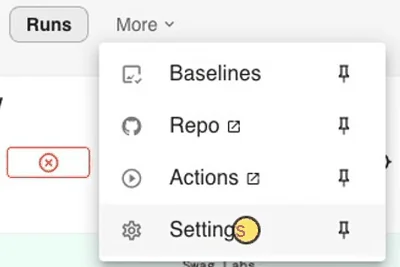
In Commander, open your project and go to More › Settings › API Keys.
-
Copy
WOPEE_PROJECT_UUIDwith its copy button. The same screen showsWOPEE_API_URL, which you need only for a dedicated or self-hosted instance.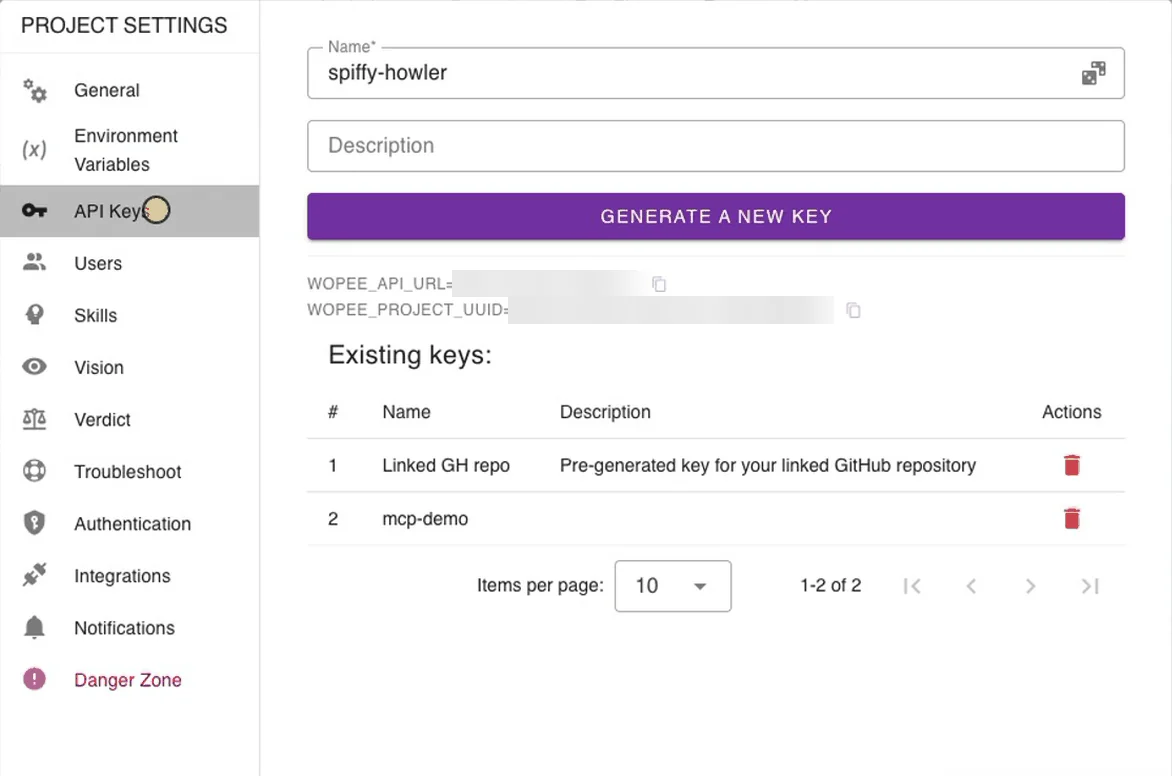
-
Enter a name, click Generate a new key and copy
WOPEE_API_KEY. The key is shown only once.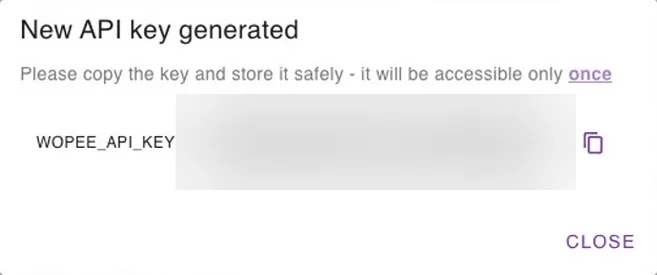
Put both values into your shell environment, not into a file you commit:
export WOPEE_API_KEY="your-api-key"
export WOPEE_PROJECT_UUID="your-project-uuid"
On Windows PowerShell use $env:WOPEE_API_KEY = "your-api-key". To keep them across sessions, add them to your shell profile or a password manager CLI.
2. Add the server to your agent
Run this in your repository, then start claude from the same shell:
claude mcp add --scope project wopee -e 'WOPEE_API_KEY=${WOPEE_API_KEY}' -e 'WOPEE_PROJECT_UUID=${WOPEE_PROJECT_UUID}' -- npx -y wopee-mcp
It writes .mcp.json with ${VAR} placeholders, which Claude Code fills from your environment at start. Details: Claude Code.
Create .vscode/mcp.json, and put WOPEE_API_KEY and WOPEE_PROJECT_UUID into .env in the workspace root (add .env to .gitignore):
{
  "servers": {
    "wopee": {
      "type": "stdio",
      "command": "npx",
      "args": ["-y", "wopee-mcp"],
      "envFile": "${workspaceFolder}/.env"
    }
  }
}
Click Start above the entry; it shows Running | 15 tools | 3 prompts. If the server shows Error, switch the chat session type to Local. Details, install link and Copilot CLI: GitHub Copilot.
Create .cursor/mcp.json, and put WOPEE_API_KEY and WOPEE_PROJECT_UUID into .env in the project root (add .env to .gitignore):
{
  "mcpServers": {
    "wopee": {
      "command": "npx",
      "args": ["-y", "wopee-mcp"],
      "envFile": "${workspaceFolder}/.env"
    }
  }
}
Switch the server on in Customize › MCPs; project servers start disabled. Details, ${env:...} variant and install link: Cursor.
Add to opencode.json in your project:
{
  "$schema": "https://opencode.ai/config.json",
  "mcp": {
    "wopee": {
      "type": "local",
      "command": ["npx", "-y", "wopee-mcp"],
      "enabled": true,
      "environment": {
        "WOPEE_API_KEY": "{env:WOPEE_API_KEY}",
        "WOPEE_PROJECT_UUID": "{env:WOPEE_PROJECT_UUID}"
      }
    }
  }
}
Details: OpenCode.
Add to ~/.codex/config.toml:
[mcp_servers.wopee]
command = "npx"
args = ["-y", "wopee-mcp"]
env_vars = ["WOPEE_API_KEY", "WOPEE_PROJECT_UUID"]
Details: OpenAI Codex.
Most clients read the universal configuration below. See Other MCP clients.
3. Ask your first question
Restart the agent (or reload its MCP servers), then ask:
How many tests do I have in Wopee.io, and which ones have never run?
The agent calls wopee_fetch_test_inventory (in OpenCode wopee_wopee_fetch_test_inventory) and answers with the number of analyses and test cases in your project and the latest status of each test case (PASSED, FAILED, INCOMPLETE, NOT_RUN, ...). This call only reads data, so it is a safe first check. A new project with no analysis yet returns zero tests: continue with Explore a new app.
Universal configuration
Most MCP clients accept this JSON. Use command and args as separate fields: clients start the server without a shell, so "command": "npx wopee-mcp" in one string does not work everywhere.
{
  "mcpServers": {
    "wopee": {
      "command": "npx",
      "args": ["-y", "wopee-mcp"],
      "env": {
        "WOPEE_API_KEY": "your-api-key",
        "WOPEE_PROJECT_UUID": "your-project-uuid"
      }
    }
  }
}
Replace the values with references to environment variables in the syntax your client supports (for example ${WOPEE_API_KEY} in Claude Code, ${env:WOPEE_API_KEY} in Cursor). Each agent's guide shows the right form. VS Code uses servers instead of mcpServers, and OpenCode uses mcp.
Environment variables
| Variable | Required | Default | Description |
|---|---|---|---|
WOPEE_API_KEY |
yes | none | Project API key from More › Settings › API Keys |
WOPEE_PROJECT_UUID |
yes | none | The project the server works with. Every tool uses it; the agent cannot switch projects |
WOPEE_API_URL |
no | https://api.wopee.io |
Only for a dedicated or self-hosted instance. Copy the value from the API Keys screen. Do not set it to an empty string |
HTTPS_PROXY, HTTP_PROXY |
no | none | Corporate proxy. HTTPS_PROXY is checked first |
NODE_EXTRA_CA_CERTS |
no | none | Path to a PEM file with your company's root certificate, for TLS inspection proxies |
Pin a version
npx -y wopee-mcp downloads the latest release on each start. To keep a version fixed, for example in CI, use ["-y", "wopee-mcp@1.32.0"] in args. The client shows the server version as 1.0.0 whatever version runs; check the version you start in args or on npm.
Several projects
One server entry works with one project. To use several projects, add one entry per project with its own key and UUID, for example wopee-shop and wopee-admin, and name the project in your prompt ("Use wopee-shop to ...").
Verify the connection
- Check that your agent lists the server as connected:
/mcpin Claude Code, Copilot CLI, Codex and Gemini CLI; the Start CodeLens in.vscode/mcp.jsonor MCP: List Servers in VS Code; Customize › MCPs in Cursor;opencode mcp listin OpenCode. Each agent's guide has the exact place. - Check that it shows 15 tools starting with
wopee_. - Ask a read-only question: "List my Wopee.io analysis suites". You get the suites of your project with their identifiers (
A001,A002, ...) and status.
If the tools load but every answer contains an error such as [AUTH_ERROR], see Troubleshooting. The server returns errors as normal text, so the client may show the call as successful.
How Wopee.io organizes your tests
The tools use the same structure as Commander:
| Level | Example | In Commander |
|---|---|---|
| Project | one web app, one WOPEE_PROJECT_UUID |
Project |
| Analysis (suite) | A001, with a suite UUID |
Analysis |
| User story | US001 "Sign in" |
User flow |
| Test case | US001:TC002 "Successful sign in" |
Scenario |
| Reusable block | R001 "Log in", used by other test cases |
Reusable scenario |
A test run ends with a verdict: PASSED, FAILED, or INCOMPLETE when the run could not prove a result (for example an infrastructure problem). INCOMPLETE says nothing about your app.
Prompt library
Name Wopee.io in the prompt, so the agent picks these tools and not a local browser. Each prompt shows the tools the agent calls.
What do I have?
How many tests do I have in Wopee.io and which ones have never run?
Tools: wopee_fetch_test_inventory. Read-only. The built-in prompt fetch-project-summary gives the same overview as two tables.
Run a test and report the verdict
Run the Wopee.io login test and tell me if it passes.
Tools: wopee_fetch_analysis_suites → wopee_fetch_artifact (USER_STORIES, to find the matching test case) → wopee_dispatch_agent → wopee_fetch_recent_executions until the verdict is in. The agent should confirm the test case before it starts the run. Runs take minutes; if the agent stops before the verdict, ask "Check the Wopee.io run again".
Explore a new app and generate tests
Use Wopee.io to analyze my app and generate tests. Focus on the checkout flow. Use TEST_USER=demo.
Tools: wopee_dispatch_analysis (with additionalInstructions and additionalVariables) → wopee_fetch_analysis_suites until the new analysis has test cases → wopee_fetch_artifact. The crawl uses the app URL and login set on the project in Commander; the tool cannot pass a URL or credentials. The analysis runs for several minutes in the background.
Build tests from your own spec
Here is our checkout spec. Create a Wopee.io suite from it and generate user stories with test cases.
Tools: wopee_create_blank_suite → wopee_update_artifact (APP_CONTEXT, written by your agent from the spec, a ticket or your code) → wopee_generate_artifact (USER_STORIES_WITH_TEST_CASES) → optionally wopee_generate_artifact (TEST_CASE_STEPS) → wopee_dispatch_agent. No crawl needed.
Add or change tests safely
In Wopee.io, add a negative test for an expired card to US003.
Tools: wopee_generate_artifact with type: TEST_CASES, selectedUserStories: ["US003"] and your instruction. The default mode UPDATE keeps existing test cases, steps and run history.
File a failed run as a GitHub issue
File the failed Wopee.io checkout test as a GitHub issue with the label bug.
Tools: wopee_fetch_recent_executions (finds the failed run) → wopee_create_github_issue with its executedTestCaseUuid. The issue carries the failing step, expected versus actual, the screenshot and a link to the run. The project needs a connected GitHub repository.
Point the tests at another environment
Set the Wopee.io project variable BASE_URL to https://staging.example.com.
Tools: wopee_fetch_variables (PROJECT) → wopee_update_variables. Variable keys are uppercase. Existing keys you do not list are kept.
Tools reference
All 15 tools work in the project set by WOPEE_PROJECT_UUID. Write tools change data in your project; let your agent ask before it calls them.
| Tool | What it does | Access | Timing |
|---|---|---|---|
wopee_fetch_test_inventory |
Counts tests per analysis with the latest status of each, including never-run ones (NOT_RUN) |
read | seconds |
wopee_fetch_analysis_suites |
Lists analysis suites with their UUIDs, identifiers (A001) and status |
read | seconds |
wopee_create_blank_suite |
Creates an empty analysis suite for tests you write or generate yourself | write | seconds |
wopee_dispatch_analysis |
Creates a suite and starts the crawl that explores the app and generates tests. Optional instructions, variables, rerun of an existing analysis | write | async, minutes |
wopee_dispatch_agent |
Starts the testing agent on chosen test cases of an analysis. Returns run handles, not results | write | async, minutes |
wopee_fetch_recent_executions |
The 20 newest runs in the project with verdict or status and a short report | read | seconds |
wopee_fetch_executed_test_cases |
Full results of the runs of one analysis, with the agent's report | read | seconds |
wopee_fetch_artifact |
Reads APP_CONTEXT, GENERAL_USER_STORIES, USER_STORIES, PLAYWRIGHT_CODE or PROJECT_CONTEXT |
read | seconds |
wopee_update_artifact |
Replaces one of those artifacts with content from the agent (whole file, not a patch) | write | seconds |
wopee_generate_artifact |
Generates app context, user stories, test cases or steps with Wopee.io's AI | write | up to 5 min; async: true for large TEST_CASES |
wopee_fetch_variables |
Reads run-time variables at project or analysis level | read | seconds |
wopee_update_variables |
Adds or overwrites run-time variables (merge, no delete) | write | seconds |
wopee_create_github_issue |
Files a GitHub issue in the project's connected repository, with run evidence when given a run UUID | write | seconds |
wopee_send_chat_message |
Posts to the project chat. For the in-app chat only; not available with a project API key | write | seconds |
wopee_read_chat_history |
Reads the project chat. For the in-app chat only; not available with a project API key | read | seconds |
wopee_generate_artifact types: APP_CONTEXT, GENERAL_USER_STORIES, USER_STORIES_WITH_TEST_CASES, TEST_CASES, TEST_CASE_STEPS, REUSABLE_TEST_CASES, REUSABLE_TEST_CASE_STEPS. Generate in order: app context, then user stories, then test cases, then steps.
Generations that replace your tests
USER_STORIES_WITH_TEST_CASES rebuilds every user story and test case of the suite, TEST_CASE_STEPS regenerates steps, and TEST_CASES with mode: CREATE replaces test cases and their run history. Use them on an existing suite only when you mean it. TEST_CASES defaults to UPDATE from version 1.32.0; older versions defaulted to CREATE.
Prompts
The server also ships three MCP prompts. In Claude Code they appear as slash commands, for example /mcp__wopee__run-test; other clients list them in their prompt or command picker.
| Prompt | What the agent does |
|---|---|
fetch-project-summary |
Lists your suites, user stories and test cases as two tables |
fetch-test-results |
Lists the latest results per suite, with a section for failed reports |
run-test |
Finds the test case that matches your request, asks "Run this test? (yes/no)", starts it and fetches the result. If nothing matches, offers a full analysis or a quick single test |
How test runs work
- Dispatch returns at once.
wopee_dispatch_agentandwopee_dispatch_analysisstart the work on Wopee.io's runners and return within seconds. They do not return the verdict. - The agent polls. Nothing is pushed back to your editor. The agent calls
wopee_fetch_recent_executionsorwopee_fetch_executed_test_casesuntil the run isPASSED,FAILEDorINCOMPLETE. A test run usually takes a few minutes, an analysis longer. If the agent stops waiting, ask it to check again. - Two suite UUIDs.
wopee_dispatch_agentcreates a new agent suite and prints it as "Suite UUID", next to the "Analysis Suite UUID". To fetch results, use the analysis suite UUID. - 10 seconds between dispatches. Each project accepts one dispatch every 10 seconds. The server retries automatically after a rate-limit answer.
- One test case per dispatch below Premium. On plans below Premium,
wopee_dispatch_agenttakes one test case per call; the agent dispatches them one by one. Several test cases in one call need a Premium or Enterprise plan. - Runs queue. Runs in a project run one after another unless the project is set to run in parallel.
- Usage counts. Runs started through MCP count toward the plan of the user who created the API key. When the limit is reached, calls return
[USAGE_LIMIT_EXCEEDED]. - Your app must be reachable from Wopee.io. The runners are in the cloud, so
localhostdoes not work. Use a public or staging URL, or see Enterprise connectivity.
Team setup
- Commit the config, never the key. Commit the project config file (
.mcp.json,.vscode/mcp.json,.cursor/mcp.jsonoropencode.json) with environment-variable references or an input prompt, as shown in each agent's guide. Each teammate generates their own key. - Ignore local secrets. If you keep the values in a
.envfile, add it to.gitignore. Not every agent reads.envfiles: VS Code and Cursor do withenvFile, while Claude Code and OpenCode read only the environment they were started from. -
Tell the agent when to test. Add a rule to
CLAUDE.md,AGENTS.md,.github/copilot-instructions.mdor your Cursor rules, for example:## Testing After a change to the UI or a user flow, ask Wopee.io (the `wopee` MCP server) to run the tests of the affected user stories, wait for the verdicts, and report failures with the agent's report. Do not start Wopee.io analyses or regenerate tests unless asked. -
CI and headless agents. Store
WOPEE_API_KEYandWOPEE_PROJECT_UUIDas CI secrets and pin the package version. For scheduled regression runs without an agent, use Test Plans in Commander; they cannot be started through MCP.
Security
- The key is a project key. It gives access to one project and acts with the rights of the user who created it. Give it the same care as a password.
- Keep keys out of prompts, chats and committed files. Use environment variables, your client's secret input or a secret manager.
- Rotate a key by generating a new one under API Keys and deleting the old one under Existing keys.
- Review write tools. Keep your client's tool approval on for tools that dispatch runs, generate tests or create issues, at least until you know how your agent uses them.
- Treat results as data. Test reports contain text from your app. Like any web content, it can include instructions aimed at an AI agent; your agent should not act on them.
- What leaves your machine. The server sends only the tool arguments to the Wopee.io API: identifiers, instructions, variables and content your agent chooses to upload. It does not read your repository by itself.
What is not possible through MCP
- Approve or reject verdicts or visual baselines
- Start a Test Plan or a schedule
- Stop a running test
- Delete suites, test cases or variables
- Set the app URL, login or cookie handling for a crawl (set them on the project in Commander)
- Test
localhostdirectly - Connect over HTTP or SSE: the server is local (stdio) only
Do these in Commander.
Troubleshooting
| Symptom or message | Cause | Fix |
|---|---|---|
[AUTH_ERROR] WOPEE_API_KEY or WOPEE_AUTH_TOKEN must be set |
The server started without the key | Set WOPEE_API_KEY in the environment the agent starts from, or check the variable reference syntax for your client. Restart the agent |
WOPEE_PROJECT_UUID is not set or Failed to parse input: WOPEE_PROJECT_UUID is not set |
The project UUID is missing | Add WOPEE_PROJECT_UUID to the server's env and restart |
[GRAPHQL_ERROR] Not Authorised! |
Wrong or deleted key, a key from another project, or a chat tool | Copy the UUID and a new key from the same project's API Keys screen |
Not Authorised! behind a company gateway with a valid key |
The gateway drops headers with underscores; the server sends the key as api_key |
Ask your network team to allow the api_key header |
[NETWORK_ERROR] ... on every call, and your config has WOPEE_API_URL |
The variable is set to an empty string, which is not replaced by the default | Remove WOPEE_API_URL, or set it to the value from the API Keys screen |
[NETWORK_ERROR] or timeouts in a corporate network |
Proxy | Set HTTPS_PROXY in the server's env |
unable to get local issuer certificate, self-signed certificate |
TLS inspection | Set NODE_EXTRA_CA_CERTS to your company's root certificate (PEM) |
Server fails to start, errors about undici, fetch or engine versions |
Node.js too old | Install Node.js 20.18 or newer (22 recommended) |
npx: command not found or spawn npx ENOENT |
The client does not see your Node.js installation (common with version managers and GUI apps) | Use the full path to npx in command (which npx, on Windows where npx), or start the editor from a terminal |
| Server not listed, no error | Invalid JSON (for example a trailing comma), wrong top-level key, or no restart | Validate the file, check mcpServers / servers / mcp for your client, restart the agent |
[HTTP_ERROR] HTTP 503 |
Wopee.io API update in progress | Retry in a few minutes |
| VS Code shows Error next to the server before the first message | The chat session type is Copilot | Switch the session type to Local under the chat input, then click Start |
| Cursor lists the server as Disabled | Project servers start disabled | Open the server in Customize › MCPs and switch on the .cursor/mcp.json source |
| The agent reports a started run but no verdict | Runs take minutes; some agents stop polling early (Copilot after about 45 seconds) | Ask "Check the result now" |
[RATE_LIMITED] or "rate limit" |
More than one dispatch in 10 seconds | Wait; dispatch tools retry automatically |
Multiple test cases are not allowed for non-premium users |
Several test cases in one dispatch on a plan below Premium | Dispatch one test case per call |
[USAGE_LIMIT_EXCEEDED] |
The plan's usage limit is reached | Wait for the limit to reset or upgrade in Commander |
Failed to create GitHub issue. Make sure the project has a GitHub repository linked. |
No connected repository, or the GitHub App lacks permissions | Connect a repository; the Wopee.io GitHub App needs Issues (read and write) and, for screenshots, Contents (read and write) |
| No API Keys in More › Settings | You are not a project admin | Ask a project admin to generate the key |
FAQ
What is the Wopee.io MCP server?
An open-source (MIT) MCP server, published on npm as wopee-mcp and in the official MCP Registry as io.github.Wopee-io/wopee-mcp. It gives AI coding agents 15 tools to explore a web app, generate tests, run them with Wopee.io's testing agent in the cloud, read verdicts and file GitHub issues. Source: github.com/Wopee-io/wopee-mcp.
Which coding agents does the Wopee.io MCP server work with?
Any MCP client that can start a local (stdio) server. This documentation has setup guides for Claude Code, GitHub Copilot, Cursor, OpenCode, OpenAI Codex, Google Antigravity and Gemini CLI, JetBrains AI Assistant and Junie, Devin Desktop (formerly Windsurf), Visual Studio and other clients. Web-only agents that accept only remote MCP servers cannot use it.
Does the Wopee.io MCP server work with Cursor?
Yes. Add it to .cursor/mcp.json or use the install link, see Add the Wopee.io MCP server to Cursor.
Does the Wopee.io MCP server work with Claude Code?
Yes. One claude mcp add command sets it up, see Add the Wopee.io MCP server to Claude Code.
Does the Wopee.io MCP server work with GitHub Copilot?
Yes, in VS Code agent mode, in Copilot CLI and in the Copilot cloud agent, see Add the Wopee.io MCP server to GitHub Copilot.
Wopee.io MCP or Playwright MCP: which one do I need?
They do different jobs, and many teams use both.
| Playwright MCP | Wopee.io MCP server | |
|---|---|---|
| What the agent gets | A browser it drives step by step | A testing agent it delegates to |
| Where the browser runs | On your machine | On Wopee.io's runners |
Reaches localhost |
yes | no, needs a reachable URL |
| Tests and history | none kept between chats | kept in your Wopee.io project, shared with your team |
| Results | page snapshots in the agent's context | a verdict with the agent's report, screenshots and a GitHub issue on request |
| Cost | free, open source | open-source server; runs use your Wopee.io plan |
Use Playwright MCP to look at a page or debug a change locally. Use the Wopee.io MCP server when you want a flow tested, kept as a test and tested again later.
Can it test my app on localhost?
No. The tests run in the cloud, so the app needs a URL that Wopee.io's runners can reach, such as a staging or preview deployment. For private networks see Enterprise connectivity.
Is the Wopee.io MCP server free?
The server is open source. Using it needs a Wopee.io account and an API key; runs and generations count toward your Wopee.io plan.
Is my source code sent to Wopee.io?
Not by the server. It sends only what your agent passes in tool calls, for example an app description it wrote from your code or a spec it uploads as APP_CONTEXT.
Does it have a remote (HTTP) endpoint?
No. It runs locally over stdio, started by your agent with npx.
Can I use several Wopee.io projects?
Yes, with one server entry per project, see Several projects.
More
- Getting started with Wopee.io: create a project and run the first analysis in Commander
- Project context: global instructions for the testing agent
- Tools & Assertions: what the testing agent does in the browser (not the same as the MCP tools above)
- wopee-mcp on npm and on GitHub