Add the Wopee.io MCP server to Cursor
Connect Cursor to your Wopee.io project, so its agent can generate tests, run them with Wopee.io's testing agent and read the verdicts. The same configuration works in the Cursor editor and the Cursor CLI (agent). What the server does: Wopee.io MCP server.
Before you start: Node.js 20.18 or newer, and WOPEE_API_KEY and WOPEE_PROJECT_UUID from More › Settings › API Keys in your project (how).
Tested on 27 October 2026 with wopee-mcp 1.32.0 and Cursor 3.15 using ${env:...}; envFile follows Cursor's documented config schema. The install link and the Cursor CLI follow Cursor's documentation.
Add to .cursor/mcp.json
Create .cursor/mcp.json in your project:
{
  "mcpServers": {
    "wopee": {
      "command": "npx",
      "args": ["-y", "wopee-mcp"],
      "envFile": "${workspaceFolder}/.env"
    }
  }
}
Put the two values into .env in the project root and add .env to .gitignore:
The config file contains no secrets, so you can commit it for your team. For a dedicated or self-hosted Wopee.io instance, also add WOPEE_API_URL to .env.
Pass your Wopee.io API key from environment variables
Instead of envFile, you can reference variables from the environment Cursor was started with:
{
  "mcpServers": {
    "wopee": {
      "command": "npx",
      "args": ["-y", "wopee-mcp"],
      "env": {
        "WOPEE_API_KEY": "${env:WOPEE_API_KEY}",
        "WOPEE_PROJECT_UUID": "${env:WOPEE_PROJECT_UUID}"
      }
    }
  }
}
Cursor must see the exported variables:
-
Start Cursor from a shell where they are set:
-
Or put the real values only into your user-level
~/.cursor/mcp.json, which is not part of any repository. Never commit a file with the key.
For a dedicated or self-hosted instance, also add "WOPEE_API_URL": "${env:WOPEE_API_URL}" and set that variable; leave the line out otherwise, because an unset variable becomes an empty string.
One-click install
The link opens Cursor and adds a server named wopee with the env references shown above. If the link does nothing (reported on some Linux desktops), add the configuration by hand.
Cursor MCP config file location
| Scope | File |
|---|---|
| Project | .cursor/mcp.json in the project root |
| Global | ~/.cursor/mcp.json |
The Cursor CLI reads the same files.
Verify the Wopee.io MCP server is connected
-
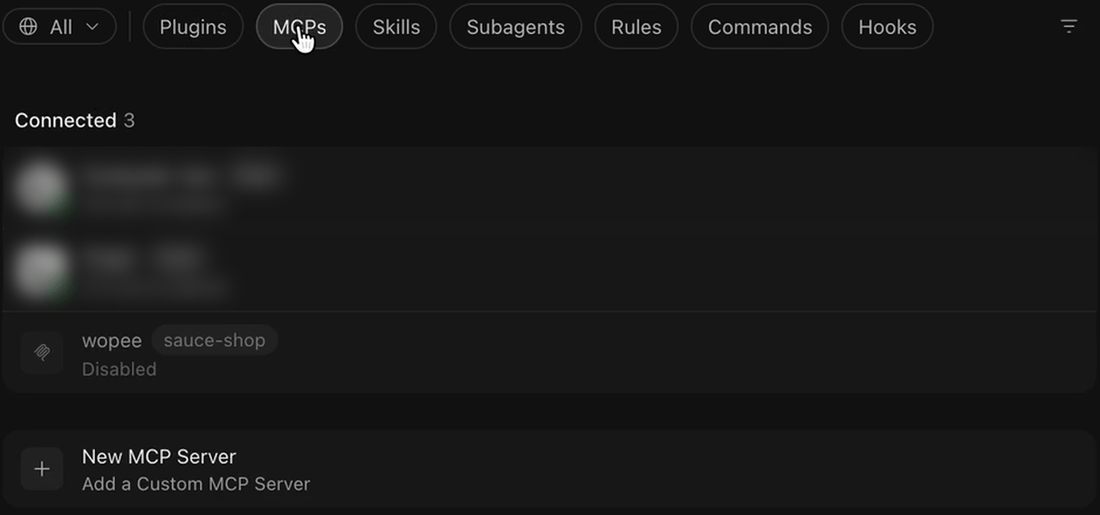
Open Customize › MCPs. A project server first shows as Disabled.
-
Open the
wopeeserver and switch on the.cursor/mcp.jsonsource. The server lists 15 tools.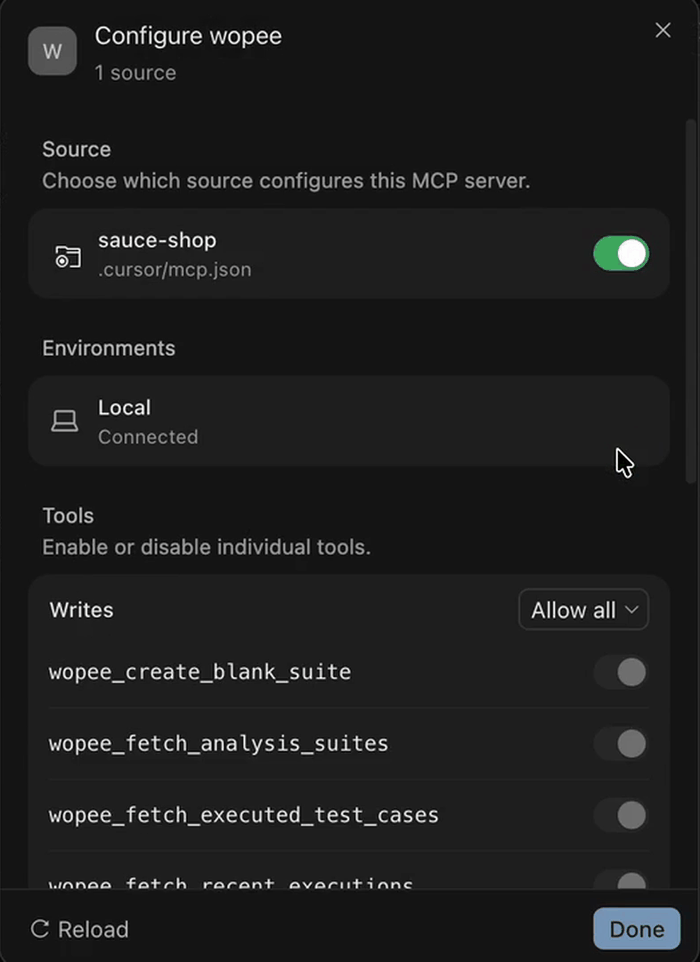
-
If it shows an error, open the Output panel (Cmd+Shift+U, Ctrl+Shift+U on Windows and Linux) and select MCP Logs.
In the Cursor CLI:
First prompt to try
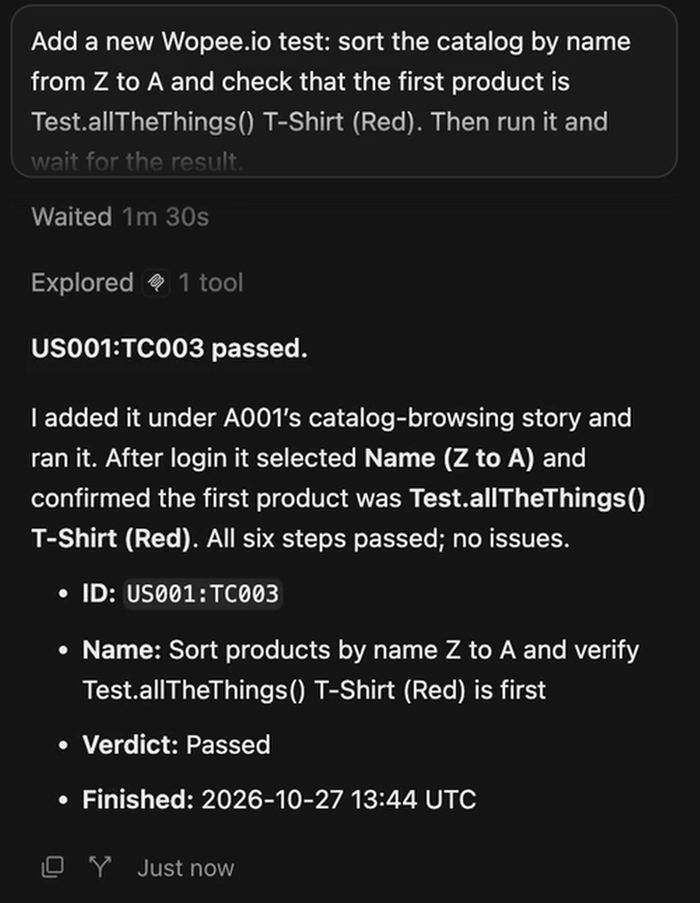
In the agent chat:
Cursor calls wopee_fetch_test_inventory and lists the analyses and test cases in your project with their latest status. More prompts: Prompt library.
Troubleshooting
| Problem | Fix |
|---|---|
[AUTH_ERROR] WOPEE_API_KEY or WOPEE_AUTH_TOKEN must be set |
With envFile, check that .env is in the project root and holds both values. With ${env:...}, Cursor does not see the variables; start it from a shell where they are exported (cursor .), or keep the values in your user-level ~/.cursor/mcp.json |
| The server is listed as Disabled | Project servers start disabled. Open the server in Customize › MCPs and switch on the .cursor/mcp.json source |
| No server is listed at all | Check that the file is valid JSON under mcpServers, then switch the server on in Customize › MCPs |
| The server shows an error in MCP settings | Check Output › MCP Logs. Usually Node.js is older than 20.18 or npx is not on the PATH; use the full path to npx in command |
| The agent uses a browser tool instead | Name Wopee.io in the prompt, or add a rule in .cursor/rules that says when to use Wopee.io |
All error messages and their fixes: Troubleshooting.
FAQ
How do I add an MCP server to Cursor?
Add the server to .cursor/mcp.json (project) or ~/.cursor/mcp.json (global) under mcpServers, or use an install link. Then switch it on in Customize › MCPs.
Where is the Cursor MCP config file?
.cursor/mcp.json in the project root and ~/.cursor/mcp.json in your home folder.
Can Cursor run end-to-end tests with MCP?
Yes. With the Wopee.io MCP server, Cursor's agent starts Wopee.io's testing agent on your test cases, waits for the verdicts and reads the agent's report. The browsers run in the cloud.