Add the Wopee.io MCP server to OpenCode
Connect OpenCode to your Wopee.io project, so it can generate tests, run them with Wopee.io's testing agent and read the verdicts from your terminal. What the server does: Wopee.io MCP server.
Before you start: Node.js 20.18 or newer, and WOPEE_API_KEY and WOPEE_PROJECT_UUID from More › Settings › API Keys in your project (how).
Tested on 27 October 2026 with wopee-mcp 1.32.0, OpenCode 1.18 and the opencode.json setup on this page. OpenCode needs a working model; the free OpenCode models (for example opencode/glm-5.3-flash-free) worked in our test.
Add to opencode.json
Add the server under mcp in opencode.json in your project root:
{
  "$schema": "https://opencode.ai/config.json",
  "mcp": {
    "wopee": {
      "type": "local",
      "command": ["npx", "-y", "wopee-mcp"],
      "enabled": true,
      "environment": {
        "WOPEE_API_KEY": "{env:WOPEE_API_KEY}",
        "WOPEE_PROJECT_UUID": "{env:WOPEE_PROJECT_UUID}"
      }
    }
  }
}
OpenCode differs from most clients in three places: the top-level key is mcp, command is one array that includes the arguments, and variables go under environment.
Add with the OpenCode CLI
The command asks for the server details interactively. Use the name wopee, a local server and the command npx -y wopee-mcp. Then open opencode.json and compare the entry with the one above, including the environment block.
OpenCode MCP config file location
| Scope | File |
|---|---|
| Project | opencode.json in the project root (overrides global) |
| Global | ~/.config/opencode/opencode.json |
| Custom | the file set in OPENCODE_CONFIG |
OpenCode merges these files.
Pass your Wopee.io API key securely
{env:WOPEE_API_KEY} is replaced with the variable from the environment OpenCode runs in. Export the variables before you start opencode:
{file:path} reads the value from a file instead. Do not put the key itself into opencode.json.
Verify the Wopee.io MCP server is connected
The output shows ✓ wopee connected. If it does not, opencode mcp debug wopee shows why.
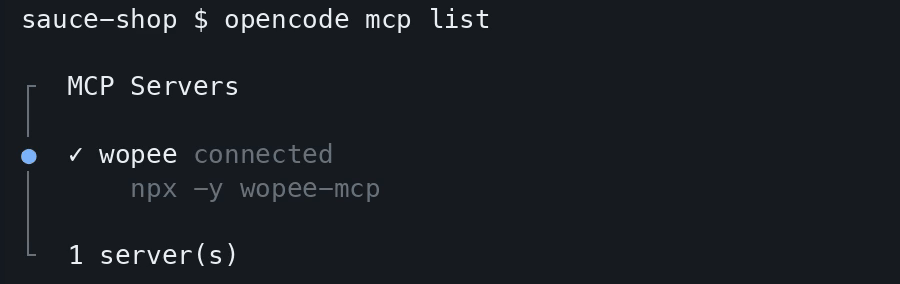
OpenCode prefixes tool names with the server name, so the agent calls the tools as wopee_wopee_fetch_test_inventory, wopee_wopee_dispatch_agent and so on.
First prompt to try
OpenCode calls wopee_wopee_fetch_test_inventory and lists the analyses and test cases in your project with their latest status. More prompts: Prompt library.

Troubleshooting
| Problem | Fix |
|---|---|
| The config is rejected | command must be an array (["npx", "-y", "wopee-mcp"]), not a string, and variables go under environment, not env |
[AUTH_ERROR] WOPEE_API_KEY or WOPEE_AUTH_TOKEN must be set |
The variables were not exported in the shell that started opencode |
| Tool calls time out | OpenCode waits 30 seconds per call by default. Long generations can take minutes: set "timeout": 300000 in the wopee entry, or ask for async: true generation |
mcp list shows wopee connected, but the chat does not answer |
OpenCode has no working model. Pick one with /models; the free OpenCode models work |
| The server takes too much context | Set "enabled": false when you do not need it, and enable it per project |
All error messages and their fixes: Troubleshooting.
FAQ
How do I add an MCP server to OpenCode?
Add it under mcp in opencode.json with "type": "local" and command as an array, or run opencode mcp add.
Where is the OpenCode MCP config file?
opencode.json in the project root, and ~/.config/opencode/opencode.json for all projects.
Can OpenCode run end-to-end tests with MCP?
Yes. With the Wopee.io MCP server, OpenCode starts Wopee.io's testing agent on your test cases, waits for the verdicts and reads the agent's report. The browsers run in the cloud.